Every Very Good FFmpeg worker now has over 3000 fonts installed. That is the full Google Fonts catalogue plus the Liberation 2 family, which covers the core Microsoft fonts. You can name any of them directly in a drawtext filter.
Previously, text rendering meant treating the font as an input file: find a .ttf, host it somewhere, add it to input_files, and point fontfile= at inputs/whatever.ttf. That still works, and nothing about it has been deprecated. It is just no longer the only option.
What changed
font='Font Name' now resolves on the worker, with no font file to download.
{
  "input_files": {},
  "output_files": ["fonts.png"],
  "ffmpeg_commands": [
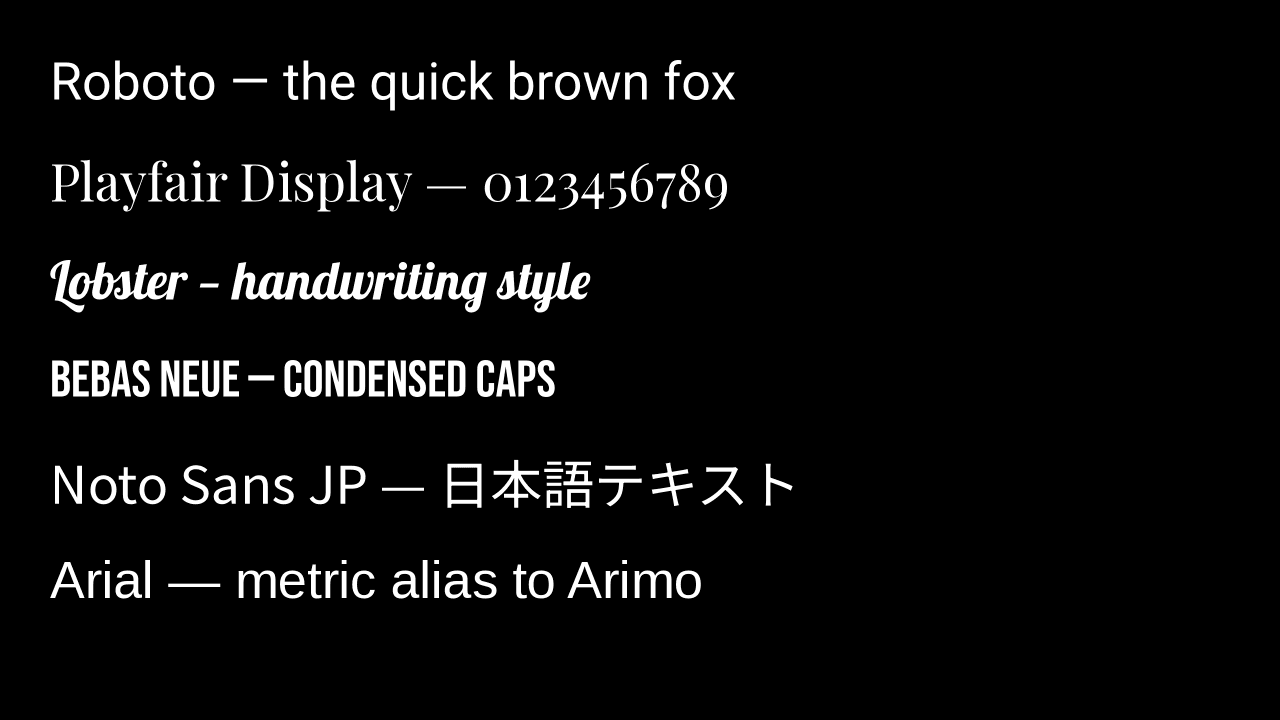
    "-f lavfi -i color=c=black:s=1280x720 -frames:v 1 -vf \"drawtext=font='Roboto':text='Roboto — the quick brown fox':x=50:y=60:fontsize=52:fontcolor=white,drawtext=font='Playfair Display':text='Playfair Display — 0123456789':x=50:y=160:fontsize=52:fontcolor=white,drawtext=font='Lobster':text='Lobster — handwriting style':x=50:y=260:fontsize=52:fontcolor=white,drawtext=font='Bebas Neue':text='BEBAS NEUE — CONDENSED CAPS':x=50:y=360:fontsize=52:fontcolor=white,drawtext=font='Noto Sans JP':text='Noto Sans JP — 日本語テキスト':x=50:y=460:fontsize=52:fontcolor=white,drawtext=font='Arial':text='Arial — metric alias to Arimo':x=50:y=560:fontsize=52:fontcolor=white\" -update 1 outputs/fonts.png"
  ]
}
Six different typefaces, including Japanese glyphs and a Microsoft metric alias, in one job with nothing to upload.
Which fonts are available
Two sources are baked into the worker image:
- Google Fonts, via the official google/fonts repository. This includes thousands of free-to-use fonts including 274 Noto families, so most writing systems are covered out of the box.
- Liberation 2, via the
fonts-liberation2package. These are metric-compatible replacements for the core Microsoft fonts: Liberation Sans for Arial, Liberation Serif for Times New Roman, and Liberation Mono for Courier New. Same widths, same line breaks, no licensing problem.
The complete list of supported fonts is published at supported-fonts.txt.
The Microsoft names themselves are not in that list, because they resolve through fontconfig's metric aliasing rather than being installed fonts. Asking for Arial gets you Liberation Sans, and it works whether or not you knew that.
Font URLs still work
There is no reason to change a working job. If you are already shipping a font as an input file, keep doing it:
{
  "input_files": {
    "my-input-file.mp4": "https://storage.verygoodffmpeg.com/sample.mp4",
    "font": "https://github.com/googlefonts/noto-fonts/raw/master/hinted/ttf/NotoSerif/NotoSerif-Regular.ttf"
  },
  "output_files": ["output-with-text.mp4"],
  "ffmpeg_commands": [
    "-i inputs/my-input-file.mp4 -vf \"drawtext=fontfile=inputs/font:text='Your Text Here':fontcolor=white:fontsize=48:x=(w-text_w)/2:y=h-th-40\" -c:a copy outputs/output-with-text.mp4"
  ]
}
This is still the right approach for a licensed brand font, a custom foundry font, or anything else that is not in the catalogue. fontfile= takes a path in the workspace exactly as before, and the input key is just a name, so font with no extension is fine. See Running Commands for how inputs and outputs are laid out.
What existing users need to do
Nothing.
- Existing jobs that download fonts with
fontfile=keep working unchanged. - Font bytes you download as an input file are still billed as processed input, the same as any other input. Fonts installed on the worker are not billed, because nothing is transferred.
- There is no migration, because both styles are supported.
The one thing worth checking: if a job previously fell back to a default font because the requested family was missing, it may now find the real font and render differently. That is the intended behaviour, but it is a visual change.
Get started
Grab a free API key (2 GB free, no credit card), pick a name out of supported-fonts.txt, and drop it straight into a drawtext filter. The example above needs no input file, so it is a two-minute copy-paste.